
Notice
Recent Posts
Recent Comments
Link
| 일 | 월 | 화 | 수 | 목 | 금 | 토 |
|---|---|---|---|---|---|---|
| 1 | 2 | 3 | 4 | |||
| 5 | 6 | 7 | 8 | 9 | 10 | 11 |
| 12 | 13 | 14 | 15 | 16 | 17 | 18 |
| 19 | 20 | 21 | 22 | 23 | 24 | 25 |
| 26 | 27 | 28 | 29 | 30 | 31 |
Tags
- count()
- len()
- Python
- string
- 반복문
- Dictionary
- 분류 결과표
- nan
- data
- list
- matplotlib
- wcss
- del
- numpy
- DataAccess
- 최댓값
- dendrogram
- 덴드로그램
- function
- hierarchical_clustering
- elbow method
- 최솟값
- analizer
- pandas
- Machine Learning
- insert()
- sklearn
- IN
- append()
- DataFrame
Archives
- Today
- Total
개발공부
[Python] Pandas Dataframe 열과 행 생성, 삭제(append(), drop()) 본문
Pandas Dataframe
새로운 컬럼 생성
df
df['shirts'] = [15, 2]
df
# pants 컬럼의 데이터와 shirts 컬럼의 데이터를 합해서, suits 컬럼을 만들기
df['pants'] + df['shirts']
df['suits'] = df['pants'] + df['shirts']
df
새로운 열 생성 append()
# 새로 추가할 데이터 프레임을 만든다
new_item = [{'bikes':20, 'pants':30, 'watches':35, 'glasses':4}]
new_store = pd.DataFrame(data = new_item, index= ['store 3'])
new_store
# 새로운 데이터인 store 3 를 원래 데이터 df에 추가한다.
df = df.append(new_store)
df
행이나 열 삭제 drop()
# 행삭제?  열삭제?  => 인덱스 삭제, 컬럼 삭제
# drop() 함수를 이용하고, axis를 설정해주면 된다.
df
행삭제 axis = 0
# store 2 삭제
# drop(삭제할인덱스나 스토어 명, axis = 0)
df.drop('store 2', axis = 0)
열삭제 axis = 1
df
# glasses 컬럼을 삭제하기
df.drop('glasses', axis = 1)
# glasses 컬럼과 suits 컬럼을 삭제하기
df
# 여러개일 경우 리스트에 담아서 쓴다.
df.drop(['glasses', 'suits'], axis = 1)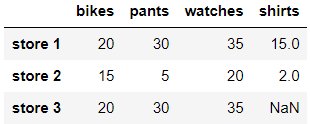
'Python > Pandas' 카테고리의 다른 글
| [Python]Pandas 카테고리컬 데이터 확인하기, 이를 묶어 처리하기 groupby() (0) | 2022.05.03 |
|---|---|
| [Python] Pandas Dataframe NaN 다루기 (0) | 2022.05.02 |
| [Python] Pandas Dataframe 인덱스, 컬럼명 변경하기(rename()), 컬럼을 인덱스로 사용하기(set_index(),reset_index()) (0) | 2022.05.02 |
| [Python] Pandas Dataframe 생성, csv읽기, 저장하기, 데이터 액세스 (0) | 2022.05.02 |
| [Python] Pandas Series 생성, 데이터 액세스, 산술 연산 (0) | 2022.05.02 |
'Python/Pandas' Related Articles
more


