
Notice
Recent Posts
Recent Comments
Link
| 일 | 월 | 화 | 수 | 목 | 금 | 토 |
|---|---|---|---|---|---|---|
| 1 | 2 | |||||
| 3 | 4 | 5 | 6 | 7 | 8 | 9 |
| 10 | 11 | 12 | 13 | 14 | 15 | 16 |
| 17 | 18 | 19 | 20 | 21 | 22 | 23 |
| 24 | 25 | 26 | 27 | 28 | 29 | 30 |
| 31 |
Tags
- 덴드로그램
- DataAccess
- append()
- list
- 최댓값
- pandas
- 분류 결과표
- string
- function
- IN
- sklearn
- elbow method
- dendrogram
- Machine Learning
- hierarchical_clustering
- DataFrame
- numpy
- 반복문
- matplotlib
- data
- insert()
- analizer
- Python
- count()
- 최솟값
- nan
- del
- len()
- wcss
- Dictionary
Archives
- Today
- Total
개발공부
[Streamlit] 파일을 업로드 하는 방법, 사이드 바 만들기 본문
사이드바 : streamlit 라이브러리의 sidebar 이용
파일 업로드 : streamlit 라이브러리의 file_uploader() 이용
##### 파일을 업로드 하는 방법 #####
##### 이미지 파일, CSV 파일 업로드

import streamlit as st
from PIL import Image
import pandas as pd
import os
from datetime import datetime

# 디렉토리 정보와 파일을 알려주면, 해당 디렉토리에
# 파일을 저장하는 함수
def save_uploaded_file(directory, file) :
    # 1.디렉토리가 있는지 확인하여, 없으면 디렉토리부터만든다.
    if not os.path.exists(directory) :
        os.makedirs(directory)
    # 2. 디렉토리가 있으니, 파일을 저장.
    with open(os.path.join(directory, file.name), 'wb') as f :
        f.write(file.getbuffer())
    return st.success("Saved file : {} in {}".format(file.name, directory))

def main() :
    # 사이드바 만들기
    st.title('파일 업로드 프로젝트')

    menu= ['Image', 'CSV', 'About']
    choice = st.sidebar.selectbox('메뉴',menu)

    if choice == menu[0]:
        st.subheader('이미지 파일 업로드')
        # file_uploader() 의 파라미터 중
        # accept_multiple_files 를 True로 셋팅하면
        # 여러 파일들을 한꺼번에 받을 수 있다.
        upload_file = st.file_uploader('이미지 파일 선택', type = ['jpg', 'png', 'jpeg'])
        if upload_file is not None :
            print(upload_file.name)
            print(upload_file.size)
            print(upload_file.type)

            # 파일명을 유니크하게 만들어서 저장해야 한다.
            # 현재시간을 활용해서, 파일명을 만든다.
            current_time = datetime.now()
            print(current_time.isoformat().replace(':', '_'))
            new_filename = current_time.isoformat().replace(':', '_') + '.jpg'

            upload_file.name = new_filename
            save_uploaded_file('temp', upload_file)


    elif choice == menu[1]:
        st.subheader('CSV 파일 업로드')
        upload_file = st.file_uploader('CSV 파일 선택', type = ['csv'])
        if upload_file is not None:
            # 파일명을 유니크하게 만들어서 저장해야 한다.
            # 현재시간을 활용해서, 파일명을 만든다.
            current_time = datetime.now()
            print(current_time.isoformat().replace(':', '_'))
            new_filename = current_time.isoformat().replace(':', '_') + '.csv'

            upload_file.name = new_filename
            save_uploaded_file('temp', upload_file)


    else :
        st.subheader('파일 업로드 프로젝트 입니다.')


if __name__ == '__main__':
    main()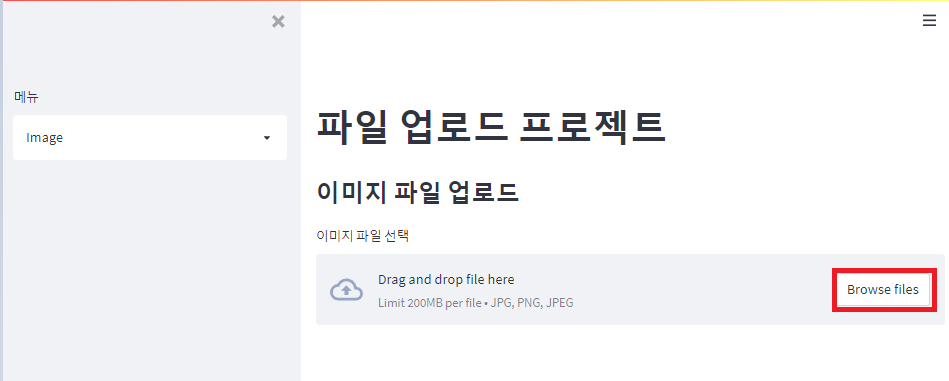

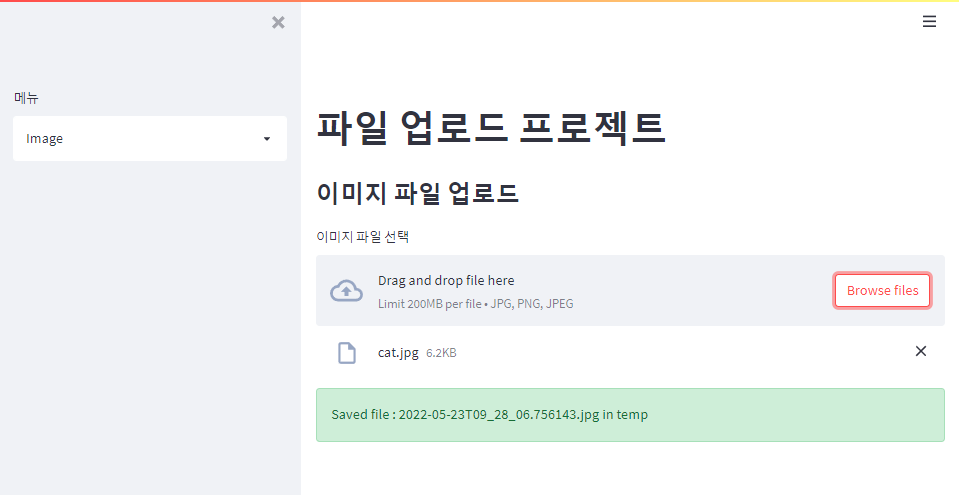
py 파일 경로의 temp로 가면 cat.jpg가 저장된 것을 볼 수 있다.
'Python > Streamlit' 카테고리의 다른 글
| [Streamlit] matplotlib, seaborn을 이용한 차트 그리기 (0) | 2022.05.23 |
|---|---|
| [Streamlit] 파일 분리하여 작업하기 (0) | 2022.05.23 |
| [Streamlit] 유저에게 입력 받는 방법(문자, 숫자, 날짜, 시간, 색깔, 비밀번호) (0) | 2022.05.23 |
| [Streamlit] 이미지, 비디오, 오디오 파일 출력하기 (0) | 2022.05.20 |
| [Streamlit] 익스펜더(Expander) 만들기 (0) | 2022.05.20 |
'Python/Streamlit' Related Articles
more


