
Notice
Recent Posts
Recent Comments
Link
| 일 | 월 | 화 | 수 | 목 | 금 | 토 |
|---|---|---|---|---|---|---|
| 1 | 2 | |||||
| 3 | 4 | 5 | 6 | 7 | 8 | 9 |
| 10 | 11 | 12 | 13 | 14 | 15 | 16 |
| 17 | 18 | 19 | 20 | 21 | 22 | 23 |
| 24 | 25 | 26 | 27 | 28 | 29 | 30 |
| 31 |
Tags
- numpy
- len()
- list
- data
- insert()
- analizer
- 덴드로그램
- string
- function
- 최댓값
- append()
- IN
- 최솟값
- pandas
- nan
- dendrogram
- count()
- matplotlib
- 분류 결과표
- elbow method
- Dictionary
- hierarchical_clustering
- DataAccess
- wcss
- 반복문
- del
- Python
- Machine Learning
- sklearn
- DataFrame
Archives
- Today
- Total
개발공부
[Streamlit] matplotlib, seaborn을 이용한 차트 그리기 본문
Streamlit 라이브러리의 pyplot() 을 이용하면
matplotlib나 seaborn을 이용해 만든 차트를 출력할 수 있다.
import streamlit as st
import pandas as pd
import matplotlib.pyplot as plt
import seaborn as sns

def main():
    st.title('차트 그리기 1')

    df = pd.read_csv('data2/iris.csv')

    st.dataframe(df)

    # 차트 그리기
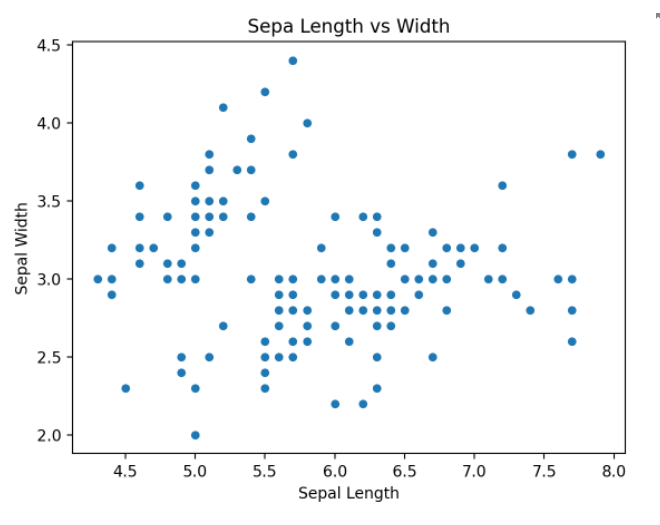
    # sepal_length 와 sepal_width 의 관계를
    # 차트로 나타내시오.

    fig = plt.figure()
    plt.scatter(data = df, x = 'sepal_length', y = 'sepal_width')
    plt.title('Sepa Length vs Width')
    plt.xlabel('Sepal Length')
    plt.ylabel('Sepal Width')
    st.pyplot(fig)

    fig2 = plt.figure()
    sns.scatterplot(
            data = df, x = 'sepal_length', y = 'sepal_width')
    plt.title('Sepa Length vs Width')
    plt.xlabel('Sepal Length')
    plt.ylabel('Sepal Width')
    st.pyplot(fig2)

    fig3 = plt.figure()
    sns.regplot(data = df, x = 'sepal_length', y = 'sepal_width')
    st.pyplot(fig3)

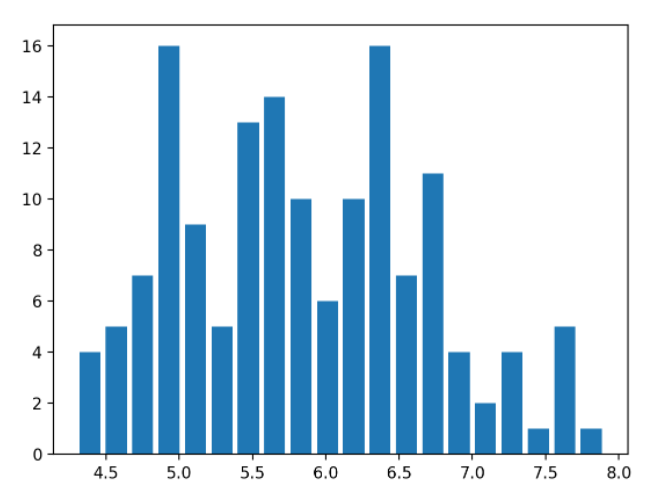
    # sepal_length 로 히스토그램을 그린다.
    # bin 의 갯수는 20개로,

    fig4 = plt.figure()
    plt.hist(data= df, x='sepal_length',bins=20, rwidth = 0.8)
    st.pyplot(fig4)

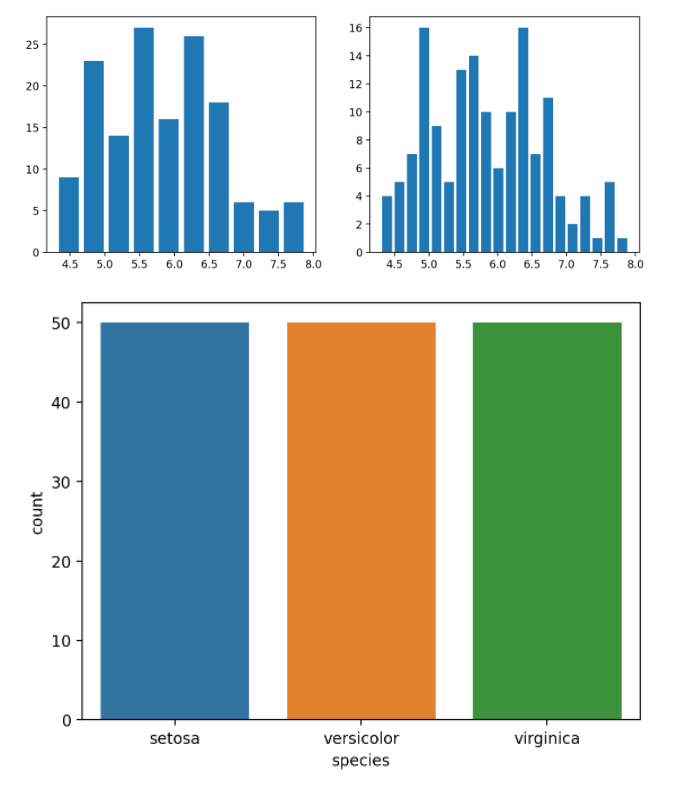
    # sepal_length 히스토그램을 그리되,
    # bin 의 갯수를 10가와 20개로
    # 두개의 차트를 수평으로 부여주기

    fig5 = plt.figure(figsize=(10,4))
    plt.subplot(1, 2, 1)
    plt.hist(data= df, x='sepal_length',bins=10, rwidth = 0.8)

    plt.subplot(1, 2, 2)
    plt.hist(data= df, x='sepal_length',bins=20, rwidth = 0.8)

    st.pyplot(fig5)

    # species 컬럼의 데이터가 각각 몇개씩 있는지
    # 차트로 나타내시오

    fig6 = plt.figure()
    sns.countplot(data = df, x='species')
    st.pyplot(fig6)


    # 지금까지 한것은 plt와 seaborn 차트를
    # streamlit에 그리는 방법이다.

    #### 데이터프레임이 제공하는 차트 함수도
    # streamlit에 그릴 수 있다.

    # species 는 각각 몇개인지, 데이터프레임의
    # 차트로 그리는 방법

    fig7 = plt.figure()
    df['species'].value_counts().plot(kind = 'bar')
    st.pyplot(fig7)

    # sepal_legth 컬럼을 히스토그램으로
    fig8 = plt.figure()
    df['sepal_length'].hist(bins = 40)
    st.pyplot(fig8)


if __name__ == '__main__':
    main()



'Python > Streamlit' 카테고리의 다른 글
| [Streamlit] 좌표 정보를 지도에 표시해주는 map() 함수 (0) | 2022.05.23 |
|---|---|
| [Streamlit] plotly를 이용한 차트그리기 (0) | 2022.05.23 |
| [Streamlit] 파일 분리하여 작업하기 (0) | 2022.05.23 |
| [Streamlit] 파일을 업로드 하는 방법, 사이드 바 만들기 (0) | 2022.05.23 |
| [Streamlit] 유저에게 입력 받는 방법(문자, 숫자, 날짜, 시간, 색깔, 비밀번호) (0) | 2022.05.23 |
'Python/Streamlit' Related Articles
more


